
Bold
𝐆𝐨𝐥𝐝𝐞𝐧 𝐇𝐨𝐮𝐫
AI FontGen’s Instagram font generator gives you 24 Unicode styles for display names, bios, and captions. Preview a style, then copy and paste Instagram fonts directly without an account or AI credits.
Preparing the text tool…
A layout example, not a live Instagram account.
These counts measure text; they do not confirm acceptance by an Instagram field.
Filter by category to compare bio fonts for Instagram or find Instagram fonts for a name or caption. Conversion runs locally in this tab without uploading your draft. Standard site resources and analytics operate separately.
To copy and paste Instagram fonts, choose a style and copy its converted text. Check how it looks where you plan to use it.

To try Instagram fonts with your own name or caption, replace the sample in our Instagram font generator. It accepts up to 2200 code points and preserves spaces and line breaks. Instagram sets separate limits for each field.
Browse categories or search this Instagram font generator by style name. Select Preview to see how your Instagram fonts look. If a style leaves some characters unchanged, check that the full result still reads clearly.
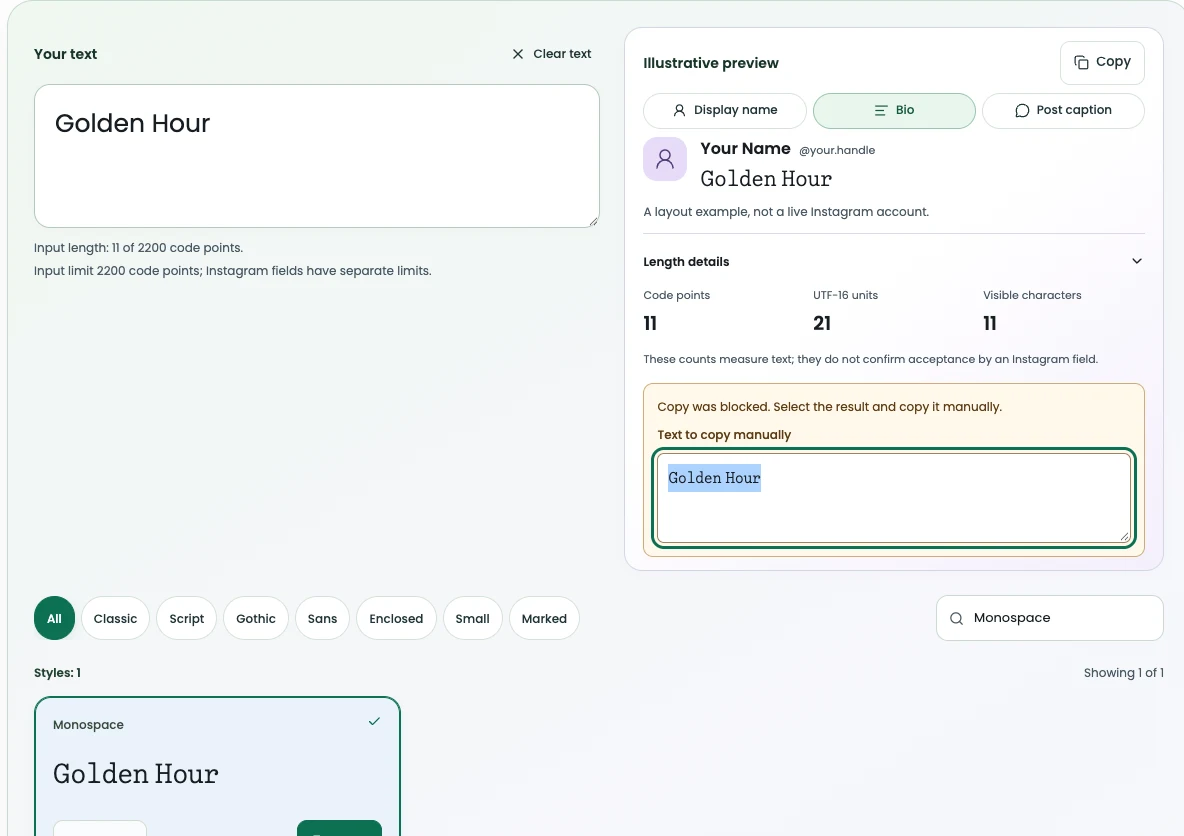
Tap Copy beside your chosen style, wait for confirmation, and paste your Instagram fonts. If clipboard access is blocked, select text in the recovery box. Clear resets your draft.
Decorative illustration
When you compare bio fonts for Instagram, check legibility, character preservation, and whether pasted text matches your preview.
For familiar shapes, try bold, italic, or monospace in our Instagram font generator. Each can add emphasis without obscuring your spelling. Instagram fonts may look different across mobile operating systems.
Compare bio fonts for Instagram at normal reading size. Use these checks before copying your Instagram fonts.
| Check | What to inspect | Why it matters |
|---|---|---|
| Readability | Can followers clearly identify each styled letter? | Decorative shapes can slow recognition |
| Preservation | Are accents, symbols, and emoji sequences intact? | Some styles add visible marks or wider forms |
| Clipboard write | Does pasted text exactly match your selected style? | Missing glyphs can vary by platform and app |
Our Instagram font generator styles supported Latin letters. Instagram fonts from this tool retain unmapped accents, Chinese characters, and complete emoji sequences.
| Input | Bold | Script | Circled | Preserved (across shown styles) |
|---|---|---|---|---|
Aa | 𝐀𝐚 | 𝒜𝒶 | Ⓐⓐ | — |
Élodie | É𝐥𝐨𝐝𝐢𝐞 | É𝓁ℴ𝒹𝒾ℯ | Éⓛⓞⓓⓘⓔ | 3 preserved output characters |
你好 | 你好 | 你好 | 你好 | 6 preserved output characters |
👩👩👧👦 | 👩👩👧👦 | 👩👩👧👦 | 👩👩👧👦 | — |
1️⃣ | 1️⃣ | 1️⃣ | 1️⃣ | 3 preserved output characters |
Sample character transformations illustrating existing mappings. These are character examples, not Instagram screenshots.
Use the Display name, Bio, or Post caption preview in this Instagram font generator. Check how your Instagram fonts look in context before copying.
For a display name, start with a style that still looks like your name. Compare bold and script in Preview, then check spelling at phone size. Once your choice is easy to read, copy and paste Instagram fonts into your display name. Use ordinary text for your unique @handle. This tool only styles the text you copy. Your account handle stays separate. If accents or letters look unfamiliar after you paste, switch to a simpler style before saving.
Start with a tagline, role, or short announcement when comparing bio fonts for Instagram. Use small caps or monospace to add emphasis and look at line breaks in your Bio preview. Keep URLs, @mentions, and searchable hashtags in ordinary text so they work as intended. Instagram fonts change letter shapes, and your profile still has its own limits. Save a plain text copy of your bio so you can edit its wording later without having to reconstruct styled text.
Try styling one line, such as a caption opener or a short comment. You can copy and paste Instagram fonts into either field as Unicode text. Read your caption at normal screen size. If you have to slow down to recognize its words, use a simpler style. Some screen readers may read styled symbols character by character, so reserve styling for emphasis. For a multiline caption, leave longer explanations in plain text. Before publishing, check that punctuation and hashtags still work where you pasted them.

When choosing an Instagram font generator, compare how each tool converts text, handles a failed copy, and stores your draft. Competitor observations reflect public testing on November 17, 2026.
Our Instagram font generator previews styles and shows a manual copy box when clipboard access is denied. This comparison covers preview, clipboard behavior, and local conversion across tested tools for creating Instagram fonts. Clipboard refusal was tested only on our tool and FontVibe. Automatic copying remains unverified.
| Workflow feature | AI FontGen | FontVibe | IGFonts | LingoJam |
|---|---|---|---|---|
| Copy refusal recovery | Manual recovery box displayed | Copied badge shown despite failure | No copy button; auto-copy unverified | No copy button; auto-copy unverified |
| Local conversion | Client-side; verified offline | Client-side; verified offline | Client-side; verified offline | Client-side; verified offline |
| Context preview | Name, bio, and caption preview tabs | Simulated bio profile header | No profile preview | No profile preview |
| Input behavior | 2,200 code-point tool cap; whole-edit rejection | 1,000 UTF-16 maxlength | No HTML maxlength; offline marker conversion passed | No HTML maxlength observed |
Advertised style totals often reflect wrappers rather than distinct alphabets. FontVibe shows 380 styles on its UI, while IGFonts presents 79 initial outputs. LingoJam generated 94 lines without unique font counts. Inspect input caps and methods before choosing Instagram fonts.
| Measurement | AI FontGen | FontVibe | IGFonts | LingoJam |
|---|---|---|---|---|
| Observed style count | 24 tested styles | UI All count 390; 380 style labels | 79 nonempty initial outputs | 94 output lines (not unique fonts) |
| Initial visible cards | 12 cards (12 on load more) | Not measured | 79 outputs in fixture | Continuous multiline stream |
| Input character limit | 2200 code points (safety cap) | 1000 UTF-16 units maxlength | No HTML maxlength (unverified) | No HTML maxlength (unverified) |
| Storage observed | None | Two local-storage keys | Not tested | Not tested |
If bio fonts for Instagram show up as boxes or fail to copy, check rendering and clipboard access separately.
When you copy and paste Instagram fonts, wait for the Copied badge. It appears once your browser confirms a successful write. If copying is blocked, select your Instagram fonts in the recovery box and copy them manually. Changing your input, search, or style resets the confirmation.
Open Length details in the Instagram font generator to see Unicode code points, UTF-16 units, and visible characters. A styled letter can use several units or contain a combining mark. If followers see boxes instead of your Instagram fonts, try a simpler style or plain text and check again where you pasted it.
Instagram fonts are styled Unicode characters rather than downloadable or installable font files. They paste directly as text rather than images. Our converter maps standard letters to mathematical alphanumeric symbols, fullwidth characters, or gothic glyphs. Unsupported characters remain unchanged so your wording stays recognizable.
Yes. AI FontGen’s Instagram fonts converter and clipboard tools are free to use without an account or credits. This free scope covers all 24 local text styles. Separate workflows in AI Font Generator Studio follow that product's account rules.
No. An Instagram fonts tool cannot modify your unique account handle (@username). Instagram permits only basic characters in handles. Styled Unicode characters are intended for your display name, bio, post captions, and comments.
Choose bio fonts for Instagram that keep your spelling clear on small screens. Compare bold, italic, and sans serif. After using the Bio preview, check that your pasted Instagram fonts still read clearly in your profile.
Instagram fields enforce independent platform limits. Our displayed counts do not verify how Instagram measures text or how much content a specific field accepts. AI FontGen applies a local 2200-code-point input limit for safety without claiming platform capacity. Review your pasted text directly in Instagram before saving.
Empty boxes, called tofu, appear when an operating system lacks coverage for specific Unicode blocks. Rather than assuming cross-device compatibility, test your draft in the destination field. If characters display as boxes, switch to simpler Instagram fonts or ordinary plain text to keep messages readable.
No. Our tool processes text in current document memory. Text drafts, searches, and results are not placed in URLs, browser storage, application logs, or analytics events. A new document starts from the default public example. Navigation and history are controlled by your browser. Standard site resources and analytics operate separately.
Continue with the lettering studio, another local text tool or the published policies.
For AI agents
Ask an external AI assistant how our Instagram font generator handles characters, which features are free, or where to read about Instagram fonts. Each link carries a fixed public question and points to English product documents. Your draft stays out of the link. Opening a link may start a query or require sign-in.